
MaxAssist brings an Exciting Enhancement
Tracker Users
If you use Tracker, you're likely familiar with the Pending Appointment Follow-Up Date. This date helps you keep track of when you'd like to contact a patient again regarding outstanding appointments.
One of the biggest advantages of MaxAssist is that you don't have to manually manage those reminders. Our intelligent workflow automatically determines when a patient should be shown on a list to contact based on previous auto-communications and the personal attempts you’ve made. In other words, MaxAssist does the tracking for you.
Until now, however, there wasn't a way to update Tracker's Pending Appointment Follow-Up Date directly from MaxAssist. That meant if your office liked keeping Tracker up to date as well, you had to maintain that information separately.
What's New?
When you record a contact attempt in MaxAssist using the patient checkmark, you'll continue to follow the same familiar workflow.
From the Due and Overdue Hygiene Lists, once you select the checkmark, and after selecting a contact method (1), you'll now be able to:
View the patient's current Pending Appointment Follow-Up Date from Tracker.(2)
Update that follow-up date directly from MaxAssist.(3)
Choose to accept our recommended follow-up date or select one that better fits your conversation with the patient.(4)
Submit to record your contact attempt and adjusted follow-up date! (5)
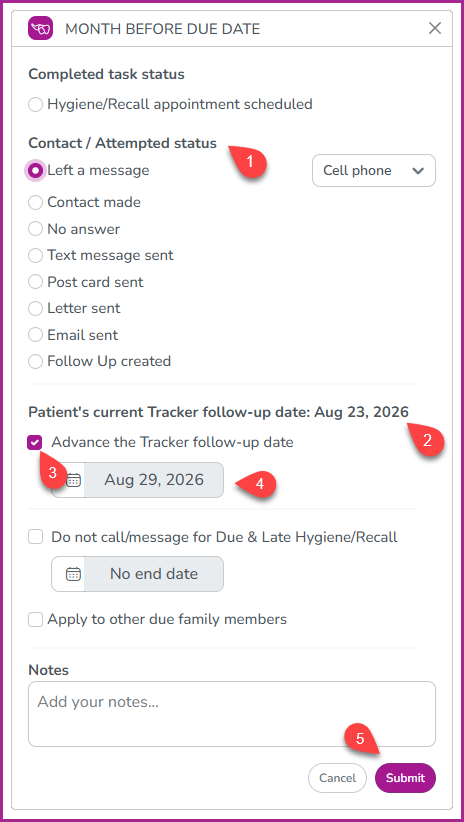
By default, MaxAssist will suggest the same follow-up date our AI would use to determine when the patient should be contacted again. However, you're always free to choose a different date.
As always, your contact attempt and notes will continue to:
Create a detailed interaction note in both MaxAssist and Tracker, which now will include an additional note to suggest you’ve modified the Pending Appointment Follow Up Date.
Feed MaxAssist's intelligent follow-up logic.
Ensure patients appear (or remain hidden) from your worklists at the appropriate time.
Important to Know
Updating Tracker's Pending Appointment Follow-Up Date does not change how MaxAssist prioritizes or recommends patients.
MaxAssist will always base its recommendations on the patient's Original Pending Appointment Date and your documented MaxAssist contact history, ensuring patients are prioritized according to when the appointment was originally intended and not simply when the next follow-up contact was scheduled.
This enhancement is designed to give you the best of both worlds:
Smart, automated patient prioritization in MaxAssist.
Accurate, up-to-date records in Tracker.
One seamless workflow without having to update two systems separately.
Keeping your systems synchronized while reducing manual work is always a priority for us, and we're excited to bring another time-saving enhancement to your daily workflow.
Please Note: This new feature is not enabled by default. If you’re interested in learning more or would like to have it enabled for your practice, please contact our Support Desk using the information below.
Phone: 1-800-651-8603 ext 1,
email: support@maxassist.com
Live text chat at www.maxassist.com
Thanks for using MaxAssist!